
CNCTOPBAOS CNC 3018-PRO Review


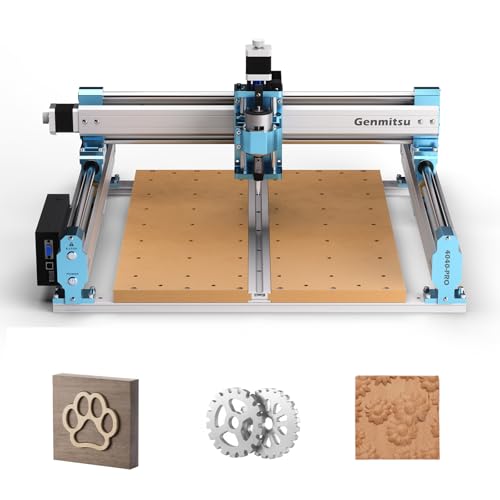
The CNCTOPBAOS CNC 3018-PRO is an entry-level CNC router celebrated for its ease of assembly and effective engraving on diverse materials. While it excels for novices and small projects, its performance does have limitations, particularly in handling complex tasks and potential backlash issues. Safety features, like the emergency stop button, enhance user confidence. Along with a thorough user manual, the package includes essential components. For comparisons to similar models and further insights, more detailed exploration is beneficial.




Main Points
- The CNCTOPBAOS CNC 3018-PRO is praised for its ease of assembly, making it ideal for novice users and small projects.
- It effectively engraves various materials but has limitations in handling complex tasks due to design constraints.
- Essential safety features, like the emergency stop button, enhance user confidence and protect against operational risks.
- The included user manual and 30-day return guarantee support first-time users in understanding and utilizing the machine effectively.
- While a solid entry-level option, users may need advanced models for intricate designs and improved reliability.
User Feedback on Performance
User feedback on the CNCTOPBAOS CNC 3018-PRO indicates a generally positive reception, particularly highlighting its suitability for novice users and small-scale projects. Many users appreciate its ease of assembly and the ability to engrave a variety of materials effectively, making it a valuable entry-level machine. However, while the performance for basic tasks is commendable, some users have noted limitations regarding durability and advanced functionality. Additionally, beginners often value machines with safety features like emergency stop buttons and limit switches, as highlighted in similar entry-level CNC router recommendations.
What We Liked
The CNCTOPBAOS CNC 3018-PRO has garnered positive feedback from users, particularly for its versatility in handling various materials such as wood, acrylic, and soft metals.
Its features overview highlights a robust design with upgraded GRBL 1.1f control board, enhancing user experience. Users appreciate the software compatibility, as it supports popular programs like Easel and Carbide Create, facilitating ease of operation.
Additionally, the straightforward assembly process and the machine's ability to execute small projects effectively contribute to its appeal as a starter CNC router.
It also appeals to beginners thanks to its 30-day return guarantee, offering first-time users added confidence when trying the machine.
Starter Machine With Limitations

Many hobbyists consider the CNCTOPBAOS CNC 3018-PRO as a promising entry point into the world of CNC machining, yet it comes with notable limitations that potential users should weigh carefully.
While it excels in handling beginner projects, the machine's design limitations restrict its ability to tackle more complex tasks. Users have reported issues with backlash in axes and concerns regarding the reliability of linear bearings and the control board.
Additionally, the absence of limit switches may hinder user experience. Consequently, those seeking a versatile tool for intricate designs may need to explore more advanced alternatives. For context, many small CNCs in this class run on a GRBL control system, which influences software compatibility and upgrade paths.
Contents of the Package
The CNCTOPBAOS CNC 3018-PRO package includes essential components such as the stepper motor, specifically a Nema17 model, which features a torque rating of 0.3N.m and operates at 1.33A.
Additionally, the package comes with an extensive user manual, providing guidance on assembly and operation, thereby facilitating user understanding and enhancing the overall experience.
These elements are vital for ensuring effective utilization of the CNC router's capabilities.
For long-term use, consider models that offer upgrade options, as they can extend the machine’s lifespan and improve performance over time.
Stepper Motor Specifications
Stepper motors play an essential role in the operation of the CNCTOPBAOS CNC 3018-PRO, ensuring precise movement and control during machining tasks.
The Nema 17 stepper motors feature specifications that directly impact stepper motor performance, including:
- Current Rating: 1.33A, providing sufficient power for effective operation.
- Torque: 0.3 N.m (43 oz-in), vital for maintaining stability during machining.
- Dimensions: 42x42x34mm, compact enough for the machine's design.
These specifications highlight the motor torque capabilities, allowing users to engage in various projects with confidence in the machine's performance and reliability. For broader context, entry-level CNCs like the LUNYEE 4040 PRO emphasize robust construction and user-friendly setup, illustrating how design choices influence precision and ease of use across affordable machines.
User Manual Included
Included with the CNCTOPBAOS CNC 3018-PRO is a user manual that serves as an essential resource for both novice and experienced users.
This thorough guide offers detailed instructions on assembly, operation, and maintenance, facilitating a smoother user experience.
It also addresses software compatibility, outlining the necessary systems for peak functionality, including compatibility with Windows and Linux.
By providing clear insights into setup and troubleshooting, the user manual empowers users to access the machine's full potential.

The inclusion of an emergency stop (E-Stop) button in the CNCTOPBAOS CNC 3018-PRO serves as a critical safety feature, allowing users to quickly halt operations in case of unforeseen circumstances.
This mechanism enhances user protection by providing a reliable means of preventing accidents or damage during operation.
Positioned for easy access, the E-Stop button contributes to user confidence and operational reliability in various working environments.
In line with best practices, CNC routers incorporate safety features to protect users during operation.
Emergency Shutdown Mechanism
Although CNC routers offer impressive capabilities for precision crafting, safety remains a critical consideration, particularly in machinery like the CNCTOPBAOS CNC 3018-PRO.
The integrated emergency shutdown mechanism, commonly known as the E-Stop button, serves as an essential safety feature. In urgent situations, this button allows users to halt all operations quickly, minimizing risks associated with equipment malfunction or user error.
The implementation of such emergency procedures enhances user confidence, promoting safer interactions with the machine. Overall, the presence of the E-Stop button underscores the importance of safety features in CNC technology, ensuring a more secure crafting environment.
Enhanced User Protection
Safety features in CNC machinery greatly enhance user protection, exemplified by the E-Stop button on the CNCTOPBAOS CNC 3018-PRO.
This essential component allows users to halt operations immediately, ensuring user safety during unexpected situations. The presence of the E-Stop button considerably improves the overall user experience, instilling confidence as operators engage with the machinery.
Quick Access Location
Positioned for immediate access, the E-Stop button on the CNCTOPBAOS CNC 3018-PRO is strategically located on the control board, enhancing operational safety.
This quick access feature is vital for users, particularly beginners, who may require immediate shutdown capabilities during the initial stages of setup and operation.
Having the E-Stop button readily available supports a swift response to potential hazards, thereby fostering a safer working environment.
Furthermore, incorporating this functionality aligns with essential beginner tips, allowing users to focus on creativity and productivity without being hindered by safety concerns, ultimately promoting a liberating experience in CNC machining.
Reliability in Use
The reliability of the CNCTOPBAOS CNC 3018-PRO in operational contexts is greatly bolstered by the inclusion of the E-Stop button, which serves as a crucial safety mechanism.
This feature directly addresses reliability concerns by providing users with a swift means to halt operations in emergencies, thereby enhancing consistent performance.
The presence of the E-Stop button contributes profoundly to user confidence, especially in complex tasks.
As users navigate potential challenges, such as backlash in axes or control board issues, the E-Stop button stands out as an essential tool in ensuring a safer and more reliable working environment for all CNC projects.
Additionally, many small-shop machines emphasize safety features like an emergency stop, making them suitable for home workshops where noise and user experience are key considerations.
Similar CNC Router Models
While the CNCTOPBAOS CNC 3018-PRO offers a solid entry point into the world of CNC routing, several similar models provide alternative options for users with varying needs and budgets.
Comparable models such as the Genmitsu CNC 3018, known for its enhanced stability and user-friendly software, and the BobsCNC E3, which features a larger workspace, cater to different preferences.
Explore alternatives like the Genmitsu CNC 3018 for stability or the BobsCNC E3 for a larger workspace, catering to diverse user needs.
Alternative brands like SainSmart and Vevor also offer competitive products that emphasize versatility and efficiency.
Evaluating these options allows users to find a CNC router tailored to their specific projects, enhancing their creative freedom and operational capabilities.
For example, the SainSmart Genmitsu 4040-PRO MAX offers a 400 x 400 x 78 mm work area and a 710W trimmer, making it a strong under-$1000 alternative for expanding project capacity.
Starter CNC for Hobbyists

For hobbyists entering the domain of CNC routing, selecting a suitable starter machine can be pivotal to their success and enjoyment.
The CNCTOPBAOS CNC 3018-PRO serves as an accessible entry point, ideal for beginner projects involving wood, plastic, or soft metals. Its relatively simple assembly encourages experimentation with various CNC accessories, promoting hands-on learning.
While the machine's capabilities may limit heavy-duty tasks, it effectively introduces users to basic engraving and carving techniques. As hobbyists gain proficiency, they can explore more advanced projects, potentially evolving to more robust models as their skills develop.
For added confidence, many portable CNC routers—including beginner models—feature emergency stop buttons and limit switches that enhance safety during operation.
Frequently Asked Questions
What Materials Can the CNCTOPBAOS CNC 3018-PRO Engrave?
The CNCTOPBAOS CNC 3018-PRO is capable of engraving a variety of materials, including wood materials, acrylic, PVC, soft metals like copper and aluminum, and even leather.
Its design allows for engraving precision, making it suitable for intricate designs and detailed work.
Users have successfully utilized this machine for crafting signs and decorative items, showcasing its versatility in handling both soft and rigid materials effectively.
Is the Software Compatible With Mac OS?
Is the quest for software compatibility a barrier for Mac OS users?
The CNC 3018-PRO's included software primarily supports Windows and Linux, leaving Mac OS users seeking alternatives.
While specific Mac-compatible options are not provided, users can explore third-party CAD programs or emulators.
This situation reveals the broader challenge of accessibility in technology, prompting potential users to contemplate their software environment before committing to this CNC router for their creative endeavors.
How Long Does It Take to Assemble the Machine?
The assembly time for the machine typically ranges from one to three hours, depending on the user's familiarity with similar devices.
Assembly tips include carefully following the provided instructions and ensuring that support directions are correct to maximize workspace.
Attention to detail during the assembly process can help mitigate issues later on.
Users should also prepare for potential challenges, as some have reported difficulties related to linear bearings and overall functionality.
Can I Upgrade the Spindle Motor Later?
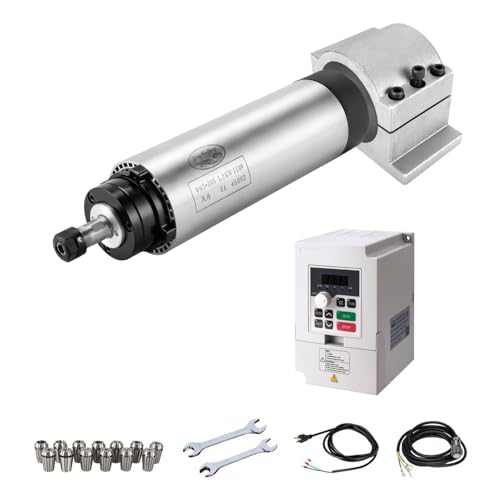
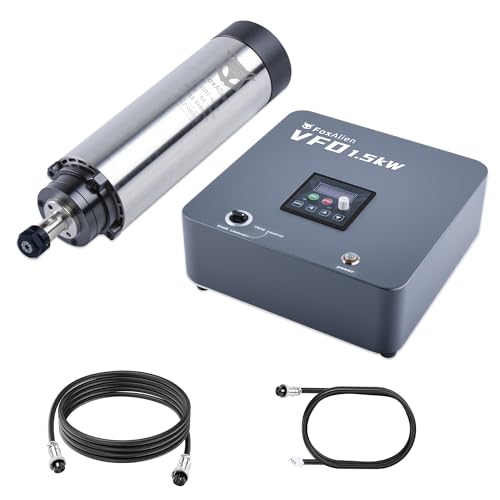
Yes, upgrading the spindle motor is feasible and can lead to significant performance enhancement.
Many users find that replacing the stock motor with a higher RPM variant increases efficiency and allows for a broader range of materials to be processed.
However, attention must be given to compatibility with the existing assembly and power specifications.
Careful research and consideration of the machine's limitations will guarantee a successful upgrade without compromising functionality.

What Is the Maximum Engraving Depth?
The maximum engraving depth for this CNC router is approximately 45mm, influenced by both material hardness and engraving precision. Depth limitations arise from the spindle motor's capabilities and the machine's design, which may restrict deeper cuts in harder materials. Users should consider these factors when planning projects, as exceeding recommended depths may lead to compromised results and potential damage to the machine, ultimately affecting its longevity and performance.

 RATTMMOTOR CNC-3018-PRO MAX Review
 FoxAlien XE-PRO 8040 Review: Is It Worth It
 CNCTOPBAOS 4540 CNC Router Machine Review
Budget-Friendly Woodworking Tools Under $100: Essential Deals for Hobbyists




Premium Woodworking Equipment: Professional-Grade Tool Savings


If you want to know other articles similar to CNCTOPBAOS CNC 3018-PRO Review you can visit the CNC router category.
This is also interesting